Icon of program: ClipX

ClipX for Windows

  • Free
  • 4.1
    123
  • 78.8K
  • V1.0.3.9
Free Download for Windows

View an ad to download for free

A handy neverending Clipboard

The Windows clipboard is a really helpful tool in our daily computer tasks, but it can still be improved with tools such as ClipX.

Top Recommended Alternative

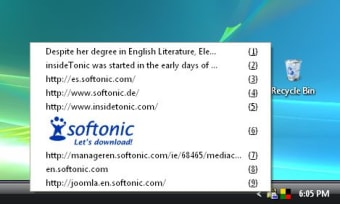
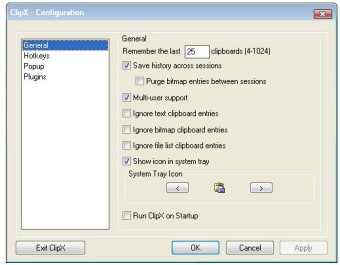
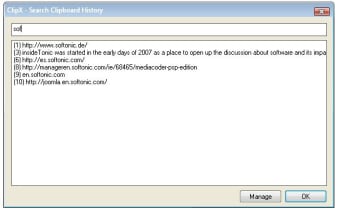
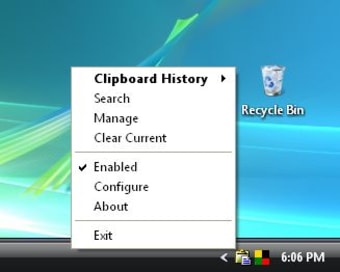
This simple program empowers your current Windows clipboard by enabling it to hold up to 1024 items instead of just one. This list not only includes text snippets of all sorts (from website URLs to short paragraphs) but also bitmap images. All the copied elements are saved on a list that can be accessed at any time from the program's icon in the system tray. This means that you can use any element previously copied to the clipboard at any moment, even if you have copied more elements afterwards.

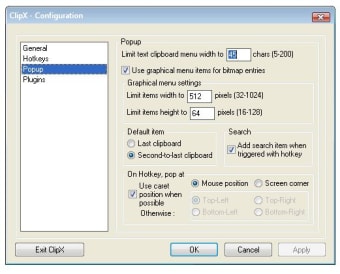
ClipX can be controlled via the program's icon on the system tray and also by means of customizable keyboard shortcuts. I must say I found this little tool so helpful I can't think of any inconvenient. If any, it would be nice to be able to save lists in plain text format. Other than that, ClipX can be considered a must-have for all those who work with the PC on a daily basis.

With ClipX you can easily improve the capacity and functionality of your clipboard, making it even more useful for all your daily computer tasks.


  • Pros

    • Improves clipboard capacity from 1 to 1024
    • Saves elements in lists for later use
    • Can copy both texts and images
  • Cons

    • It would be great to be able to save lists in plain text
 0/5

App specs

  • License

    Free

  • Version

    1.0.3.9
  • Latest update

  • Platform

    Windows

    Other platforms (1)
  • OS

    Windows ME

  • Language

    English

  • Downloads

    78.8K

    Last month's downloads

    • 156
  • Size

    134.91 KB

  • Developer

Also available in other platforms

Program available in other languages


Icon of program: ClipX

ClipX for PC

  • Free
  • 4.1
    123
  • 78.8K
  • V1.0.3.9
Free Download for PC

View an ad to download for free


User reviews about ClipX

4.1

3 reviews

Add review

Main reviews for you

  • Anonymous user

    Not to be trusted. it worked fine for a little while I am running windows 10 and after coping text I cleared the text from clipx memory and turned clipx off the next time I used clipx the same text was back in memory. so I uninstalled clipx and reinstalled it and the same thing happened. In my opinion clipx leaves behind hidden files. Pros: not much Cons: it uses your location and creates hidden files

  • Anonymous user

    Works great sometimes. have it on other computers and love it. I can not get it to work on my new Win 7 machine. It's there and configured but won't pop up. Very disappointing.Gary C

  • Anonymous user

    Best clipboard manager. The best way to manage and power up a clipboard. Light and very functional. Pros: It works perfect! Cons: None

More

You may also like

Alternatives to ClipX

Explore Apps

Latest articles

Laws concerning the use of this software vary from country to country. We do not encourage or condone the use of this program if it is in violation of these laws.
Softonic

Is ClipX safe?

99/100

Score result: Clean

This file passed a comprehensive security scan using VirusTotal technology. It is safe to download.

  • Virus free
  • Spyware free
  • Malware free
  • Verified by Security Partners

    VirusTotal logo

Scan Info

Last scan
Thursday, March 26, 2026
Scan provider
VirusTotal · Full report

File Integrity

File
ClipX_V1.0.3.9.exe
SHA256
180e7ccae841511988b9e46c17246c6f26a0adcc17eb67088abf2fe2f181d821
SHA1
b156ee0654536065b4fd9f7a780045541b587f89

Softonic security commitment

ClipX has been thoroughly scanned by our advanced security systems and verified by industry-leading partners. This file comes from the official developer and has passed all our security checks, showing no signs of viruses, malware, or spyware. For more information, visit our Security and Trust Center

Signed in to Softonic as